UGC Portfolio Course & Canva Template
Feeling Stuck Building Your UGC Portfolio?
Does building your UGC portfolio feel complicated and overwhelming?
This UGC portfolio mini-course walks you through the process slowly, clearly, and without pressure.
You Don’t Need a Perfect Portfolio - You Need a Clear One
You might be good at creating create content, but building a portfolio feels overwhelming. You don't know what to include, how to organize it, or how to make it look professional.
This step-by-step tutorial was created to bridge that gap and guide you through the process with clarity and confidence.
In a few hours, you'll...
Learn what actually belongs in a UGC portfolio
Understand how brands read and evaluate portfolios
Build your portfolio alongside the training
Focus on clarity and conversion — not over-polish
You move at your own pace, with clear direction the entire way.
Most UGC courses skip the portfolio training that you need the most.
Many UGC courses include Canva templates and briefly cover creating your portfolio. It's not enough!
What is often missing is the detailed, step-by-step walkthrough that shows you how to actually use those templates, why certain sections matter more than others, and what to focus on first.
In just a few hours, you'll have a portfolio ready to send to brands.
What’s Included:
Build a clear, brand-ready portfolio, step by step
Understand what brands actually respond to when looking at portfolios
A Canva template professionally designed by a 15-year web designer and UGC creator
Move at your own pace (no deadlines, no pressure)
Course Modules
A Step-by-Step Course to Build Your UGC Portfolio
Module 1: Template Overview and Set Up
A walkthrough of the provided custom Canva template, along with the set up process, branding, and layout so your portfolio starts on solid ground.
Module 2: Build Your Portfolio
Follow a guided, section-by-section build so your videos, images, copy, and social proof come together in a clear, mobile-friendly layout.
Module 3: Optimize for SEO and AI
Fine-tune your portfolio for visibility, discoverability, and long-term growth so the right brands and platforms can find you easily.
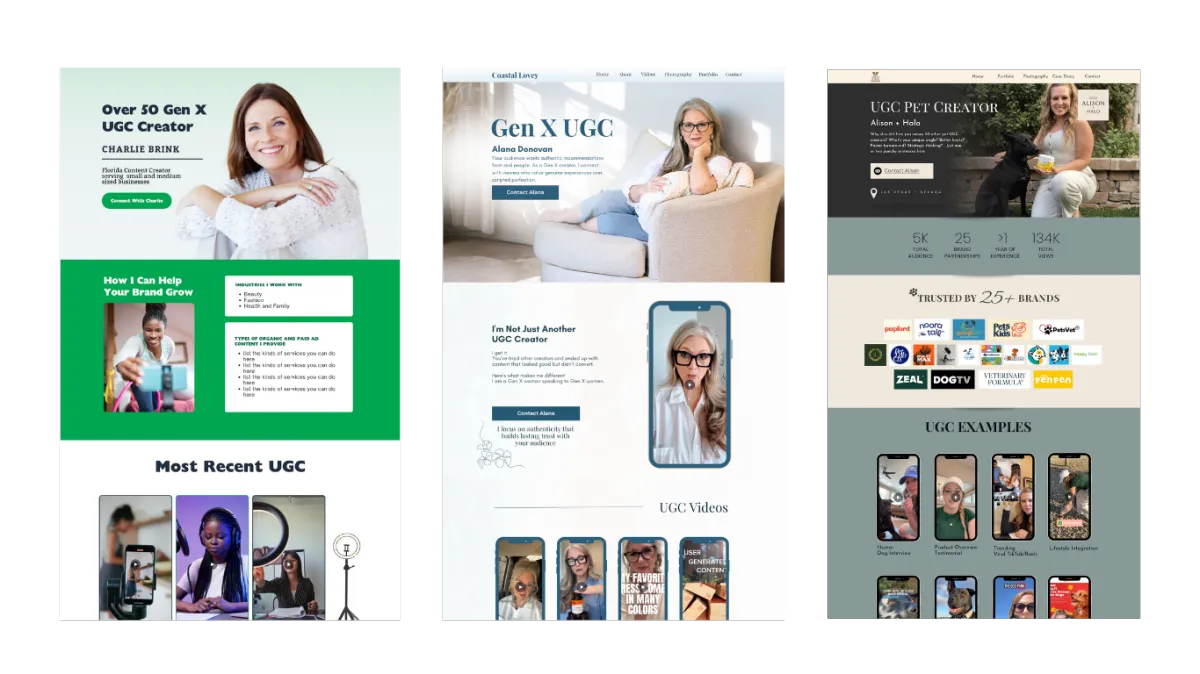
Content Creators Who Use My Custom UGC Portfolio Template

Hi, I'm Jenny!
I help new and experienced UGC creators build portfolios that brands love!
As an experienced web designer and SEO/AI strategist with over 15 years in the field, I've helped countless businesses and content creators optimize their online presence for both search engines and conversions.
After seeing many UGC creators struggle with basic Canva templates that weren't built for SEO or client conversion, I combined my web design expertise with my understanding of what brands really look for, to create this professional portfolio template.
In the UGC marketplace, you want to get in front of premium clients so you can command higher rates.
My goal is to help you strike that perfect balance between showcasing your creative side and presenting yourself as a serious business professional .
If you want a realistic, step-by-step way to build your UGC portfolio without pressure or confusion, this mini-course is here for you.
A Quick Note Before You Decide
This course IS a good fit if:
You’ve taken UGC courses but still feel unsure about how to build your portfolio.
You'd feel better with someone walking you step-by-step through the process.
You know a polished portfolio is needed to take your UGC business to the next level.
This may not be the right fit if…
You don't think a UGC portfolio is that important or that you really need one.
You want something completely done for you, without participation
You’re hoping a template alone will be enough without any further instruction.
If this feels like the kind of support you’ve been looking for, you can get instant access below.
Purchase UGC Portfolio Course
What UGC Creators Are Saying
Testimonials from creators who finally felt confident sending their portfolio to brands.
"Thank you, Jennifer! 🙏 Excellent information and easy to follow along. Definitely didn't even think about the SEO aspect on my previous one so that was very helpful. Also the Search Console, didn't even think about that. I already have several websites that use it so it was a simple process for me. Still have some tweaking to do but off to a much better start."
Creative5 Member
"She helped me learn how to make my UGC portfolio exactly what I wanted and cut out so much of the frustration I would have felt doing it alone. She tracks down answers quickly and helps bring a professional and polished feel to my portfolio. I will definitely be working with her again!"
Elizabeth, UGC Creator
"I want to give a big thank you to Jennifer for her help and an excellent course in getting my portfolio fixed up. I still have some things to tidy up, it's only been live for a week or two and I don't even have it posted yet until I get it 100%. However because of her excellent information on SEO I've already had 2 people email me because they found it.
Update on the inbound. I literally just got an email back from one of the brands and have signed a contract for 2 30 second edited videos with 2 additional hooks for $500.00! My biggest income so far for one collaboration!
Super stoked!"
Robert, UGC Creator
Frequently Asked Questions
If you don’t see your question here, email us at [email protected] and we’ll get back to you within 1–2 business days.
How much time do I need to create my portfolio?
Most students spend 60 minutes on lessons and another 2 hours (give or take) with the included template. You can move faster or slower depending on your schedule and what you have prepared (videos, copy) — you have lifetime access to everything.
What do I need?
You will need access to Canva (free version is fine).
You need the videos and UGC photos you plan to include and I help you understand what types brands are looking for,
Access to Google Docs.
Is this right for me if I already use another website platform?
Yes, and no. Yes if you want to learn about what brands are looking for in your UGC portfolio and want tips about how to improve your current portfolio (SEO/AI included). However, I won't be going over other website platforms in this course.
Is this a live training?
This is not a live training. This is a DIY step-by-step demonstration of how to build your UGC portfolio on the template I provide.
How long do I have access?
You have lifetime access to this course including all updates.
Ready to create a UGC portfolio that makes
brands want to work with you?
No pressure, no hacks, just a calm, walk-through you can rely on to help you publish your UGC portfolio. One-time purchase. Lifetime access.